An AI automation audit is a ranked list of the repetitive work your team does, scored by how much time it takes and how well it suits automation. It answers one question: what should we automate first? You can run a first version yourself with a spreadsheet and a few conversations.
Why audit before you build?
The opportunity is real. McKinsey estimated in 2023 that "current generative AI and other technologies have the potential to automate work activities that absorb 60 to 70 percent of employees' time today."
Capturing it is the hard part. In McKinsey's 2025 State of AI survey, redesigning workflows had the biggest effect on whether an organization saw bottom-line impact from generative AI. Yet only 21% of respondents whose organizations use gen AI said they had fundamentally redesigned at least some workflows, and fewer than one in five said they track KPIs for their gen AI solutions.
Gartner adds a warning. It predicts that more than 40% of agentic AI projects will be canceled by the end of 2027, citing escalating costs, unclear business value, and inadequate risk controls. An audit exists to deal with those three problems before any money goes into a build.
Step 1: List the work, not the tools
Start with what people do, not with what software can do. For each team, list the tasks that repeat: work done daily or weekly, with roughly the same steps each time. Good places to look are shared inboxes, spreadsheets updated by hand, anything copied from one system into another, and reports someone assembles every week.
Ask the people doing the work. They know the exceptions that no process document mentions.
Step 2: Measure volume and time
For each task, record two numbers: how many times it happens per month and how many minutes it takes each time. Multiply them to get hours per month. Use counts from your systems where you can, such as tickets closed or invoices processed, rather than estimates.
Collect five to ten real examples of each task as you go. You will need them for testing later.
Step 3: Score how well each task fits automation
| Question | Good fit | Poor fit |
|---|---|---|
| Are the rules clear? | Someone can explain the task in a few sentences | Every case is a judgment call |
| Are the inputs digital and consistent? | Forms, emails, and PDFs in a known layout | Handwriting, scattered sources, missing data |
| What does an error cost? | Easy to spot and undo | Hard to reverse, or it reaches a customer or regulator |
| How often do exceptions come up? | Rarely, and they can go to a person | Constantly |
| Is sensitive data involved? | No, or handling rules already exist | Yes, with no clear rules for handling it |
Score each task high, medium, or low on fit. Tasks that involve reading documents or free text are no longer off limits, since AI can now read them, but they need a review step.
Step 4: Rank by hours and fit
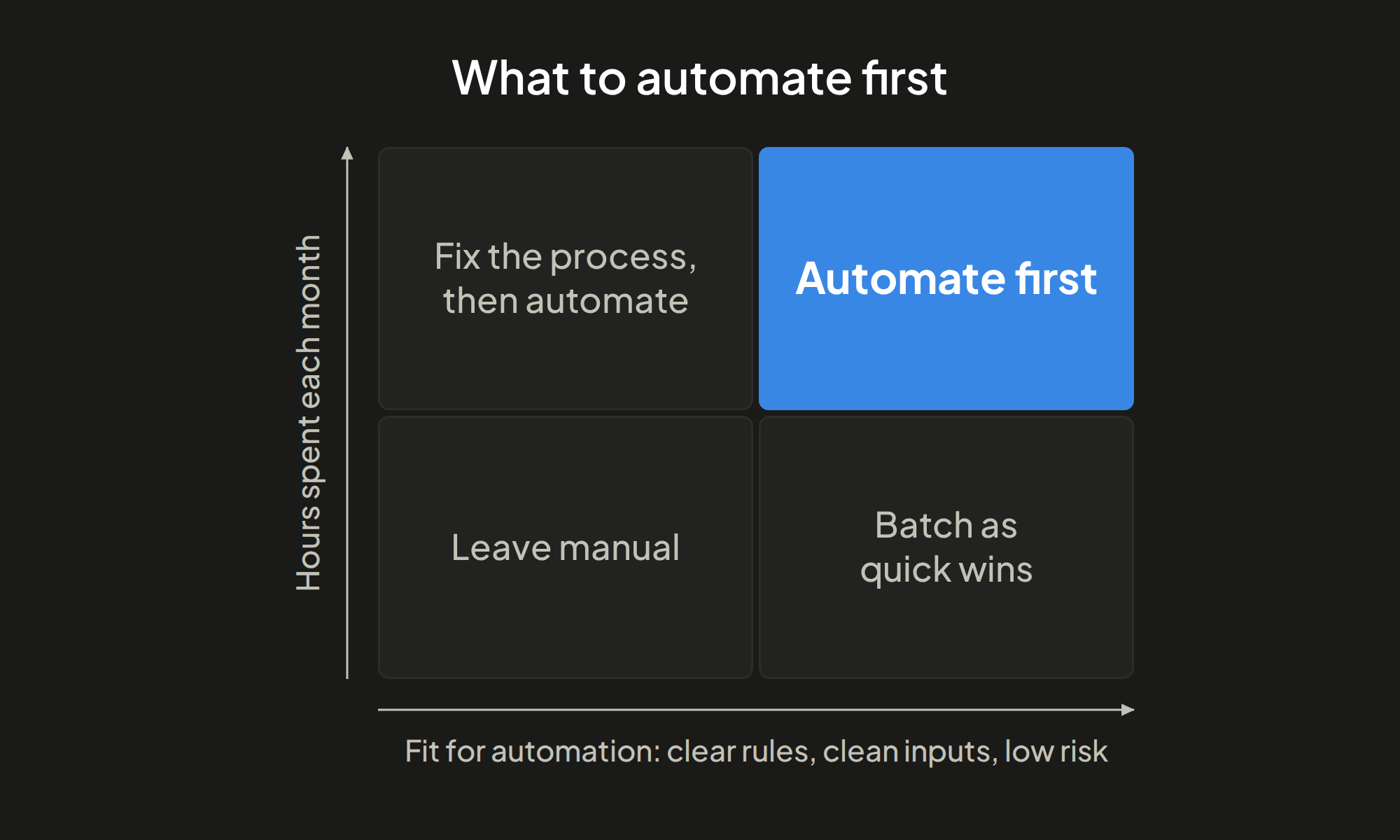
Place each task on two axes: hours per month and fit. The chart at the top of this article shows the four outcomes.
- High hours, high fit: automate first. This is where the return is clearest.
- High hours, low fit: fix the process, then automate. Standardize how the work is done before building anything.
- Low hours, high fit: batch as quick wins. Worth doing when several can be built together at low cost.
- Low hours, low fit: leave manual. The effort would not pay back.
Step 5: Choose the lightest approach that works
For each task near the top of the list, pick the simplest design that does the job:
- Rule-based automation for steps with no judgment, such as moving data between systems.
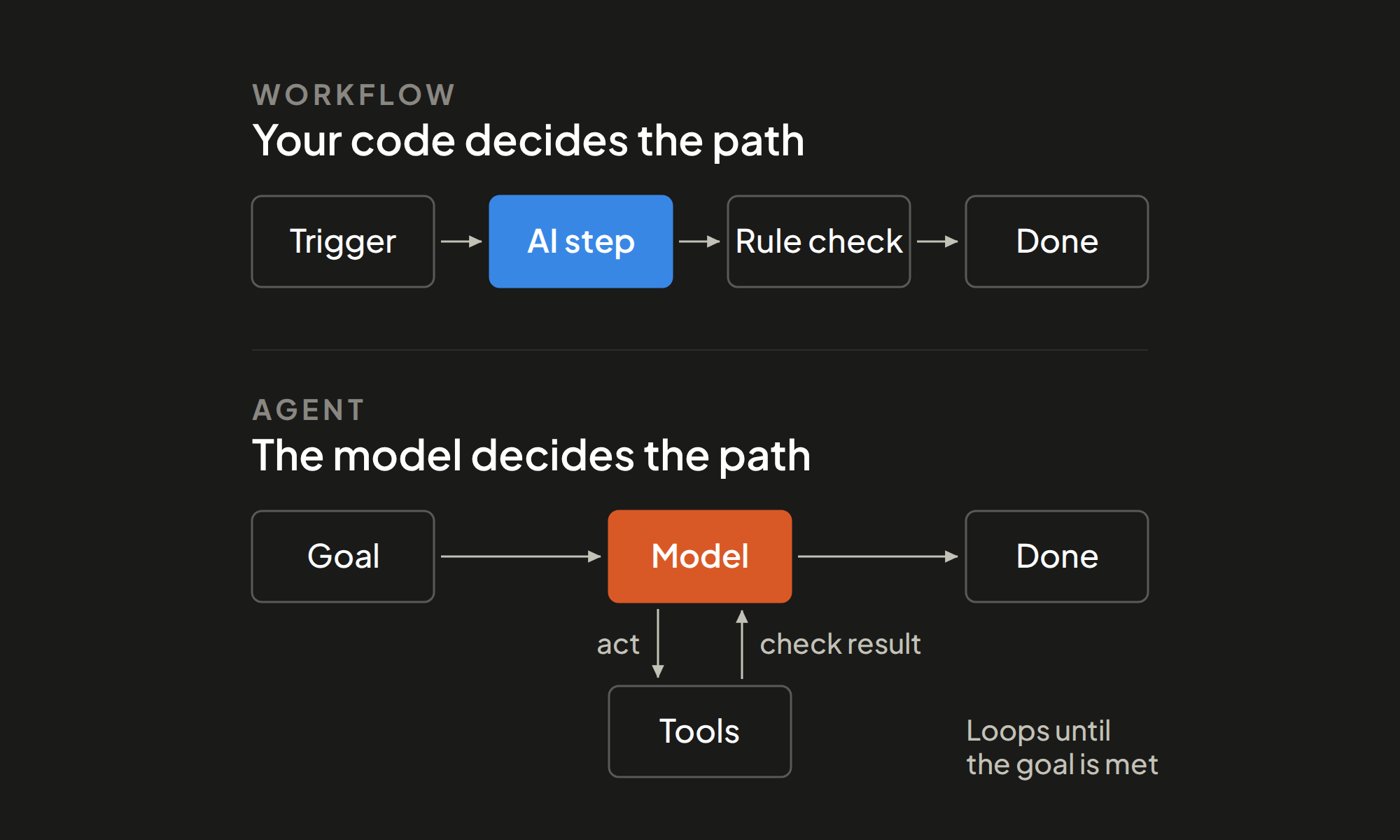
- A workflow with AI steps when something needs to be read, classified, or drafted along a fixed path.
- An AI agent only when the steps cannot be listed in advance.
- Manual work when errors are costly and volume is low.
Anthropic's engineering guide states the principle plainly: "we recommend finding the simplest solution possible, and only increasing complexity when needed." Our guide to AI agents vs AI workflows covers this choice in detail.
Step 6: Set a baseline, then pilot one thing
Before building, write down today's numbers for the chosen task: hours per month, turnaround time, and error rate. Decide what result would count as success and when you will check.
Then build one pilot, with a person reviewing the output, and compare against the baseline on that date. This is the KPI tracking that fewer than one in five respondents in McKinsey's survey reported doing.
An example scoring sheet
The rows below are illustrative, not client data. They show how the ranking works.
| Task | Runs per month | Minutes each | Hours per month | Fit | Decision |
|---|---|---|---|---|---|
| Entering supplier invoices into accounting | 400 | 6 | 40 | High | Automate first |
| First reply to web inquiries | 300 | 5 | 25 | High | Automate first |
| Client onboarding, done differently by each manager | 30 | 60 | 30 | Low | Fix the process, then automate |
| Weekly status report | 4 | 90 | 6 | High | Quick win |
| Contract negotiation | 10 | 120 | 20 | Low | Leave manual |
Common mistakes in an AI automation audit
- Starting with a tool and looking for somewhere to use it.
- Automating a broken process, which only produces errors faster.
- Skipping the baseline, so no one can show whether the automation worked.
- Choosing the most impressive project instead of the one with the most hours and the best fit.
- Ignoring exceptions and sensitive data until after launch.
When to bring in help
You can run this audit in-house. Outside help earns its place when no one has time to map the work, when you need realistic build costs next to each opportunity, or when regulated data is involved.
Lean Discovery Group's AI consulting services start with an automation audit and end with a roadmap that ranks each opportunity by return, effort, and risk. Because we are a software development firm, the same team can then build the first project. See all of our AI automation services or book a discovery call.
Frequently asked questions
What is an AI automation audit?
A structured review of the repetitive work a team does, scored by time spent and fit for automation. The output is a ranked list of what to automate first, what to fix first, and what to leave manual.
What should a business automate first?
Tasks with high monthly hours and high fit: clear rules, digital and consistent inputs, and errors that are easy to spot and undo.
Do you need a consultant to run an AI automation audit?
No. A spreadsheet and conversations with the people doing the work are enough for a first pass. Outside help is useful for build cost estimates, regulated data, or when the team has no time to map the work.
How do you know whether an automation worked?
Record a baseline before building: hours per month, turnaround time, and error rate. Compare the same numbers at a fixed date after launch.
What should not be automated?
Low-volume work where mistakes are costly or hard to reverse, and processes that are done differently every time. Standardize those first or leave them with people.
Sources
- McKinsey, "The economic potential of generative AI: The next productivity frontier," June 14, 2023
- McKinsey, "The state of AI: How organizations are rewiring to capture value," March 12, 2025
- Gartner, "Gartner Predicts Over 40% of Agentic AI Projects Will Be Canceled by End of 2027," June 25, 2025
- Anthropic, "Building Effective AI Agents," December 19, 2024